MMM Optimizer
- Overview
- Methodology
- Single Brand
- Cross Brand
- Headless
MMM Optimizer: Overview
What is the MMM Optimizer?
The MMM Optimizer answers one question:
"Given what the model has learned about each media vehicle, where should the next dollar go?"
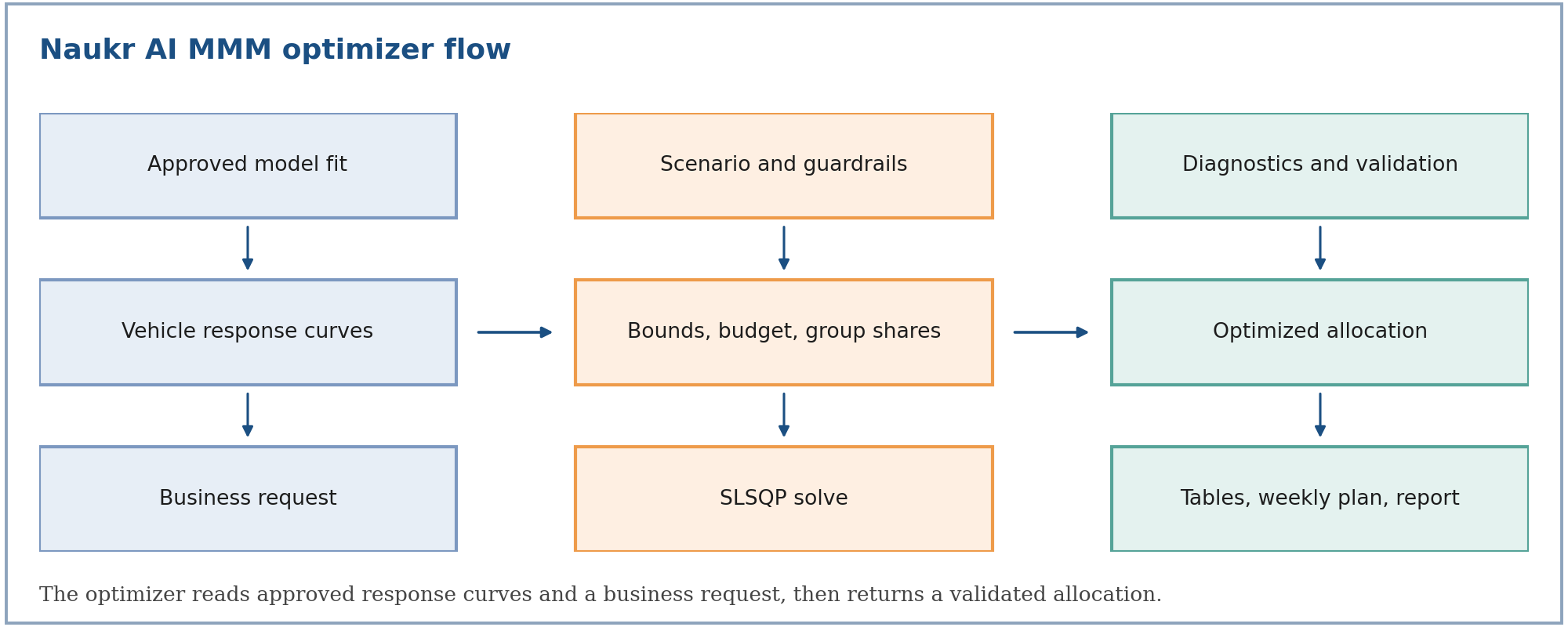
It takes the response curves of an approved Naukr AI MMM and a business request, such as keep the budget flat, raise it by 10%, hold one vehicle fixed, or move at most 15% per vehicle. It returns a deterministic, validated allocation: the best split of budget across vehicles (and, for portfolios, across brands) that respects every guardrail.
Budget optimization is a later-stage use of approved model outputs. It never runs on a model that has not passed the quality gates described in the MMM documentation.
What we offer
| Capability | What it gives you |
|---|---|
| Single brand | Reallocate one brand's budget across its own vehicles, with vehicle-level pins, Traditional / Digital group limits, locks, and a weekly plan |
| Cross brand | Reallocate one combined budget across several independently fitted brands in one joint solve, with brand-level and vehicle-level limits |
| Headless | Run either of the above on a saved scenario against a pinned, approved fit, with no interactive session: start it from a scenario, an agent or the API, and collect the outputs afterwards |
All three share one solver and one set of outputs, so a result means the same thing whichever way it was started.
Objectives
| Objective | Maximizes |
|---|---|
| Volume | Total incremental response (units, conversions, sales volume) |
| Revenue | Total incremental revenue (price per unit times response) |
| Profit | Total incremental profit net of media spend (margin per unit times response, minus spend) |
Business controls
- Total budget: keep it flat, raise it, or cut it by a percentage. The change applies to the movable (unlocked) budget.
- Vehicle limits: a one-sided limit pins a vehicle to exactly that change; a two-sided limit sets a range.
- Group limits: Traditional and Digital totals, with a built-in movement cap.
- Brand limits (cross brand): brand totals, with a built-in movement cap.
- Locks: vehicles that must stay at current spend, such as non-paid media.
- Macro assumptions: media-cost inflation and price inflation, applied to the optimized side of the reporting only.
Outputs
| Output | Content |
|---|---|
| Detailed media analysis | A three-level table (portfolio, group or brand, vehicle) with current vs optimized spend, volume, revenue, profit, ROI and cost per unit |
| Weekly flighting plan | Each vehicle's annual optimum phased across 52 weeks by its own history, tilted toward historically efficient weeks |
| Optimization summary | Solver status, validation gates, constraint adjustments, and the assumptions used |
| Report (PDF) | A business-readable summary with weekly budget charts (one per brand for portfolios) |
Why it matters for business
The optimizer uses the marginal return of each vehicle (what the next dollar buys), not the average return. Average ROI rewards vehicles that are already saturated; marginal ROI finds where extra spend still works. At the optimum, every vehicle that is free to move earns the same marginal return, and vehicles held back by a limit earn more or less than that, which tells you which guardrail is costing you.
It helps teams decide:
- how to reshuffle a flat budget,
- where an extra 10% should go,
- which vehicles to cut first when the budget shrinks,
- whether budget should move between brands.
Where it fits in the product experience
- Fit and approve an MMM (see the MMM documentation).
- The approved fit publishes one response curve per vehicle.
- Create a scenario: objective, budget change, limits, locks.
- Run the optimizer (single brand, cross brand, or headless).
- Review the three-level table, the weekly plan, and the validation gates.
Quick reading guide
| Question | Where to look |
|---|---|
| How are the curves defined and where do they come from? | Methodology |
| How do I reallocate within one brand? | Single Brand |
| How do I move budget across brands? | Cross Brand |
| How do I run an optimization without the UI? | Headless |
What the optimizer does not do
- It optimizes annual spend per vehicle. Carryover is already embedded in each curve; it is not re-simulated week by week.
- It optimizes on each vehicle's fitted mean curve. Credible bands are published for display but do not enter the solve.
- For S-shaped curves the problem is not concave, so the solver returns a local optimum and reports whether it converged and passed validation.
- It does not check that response units match across brands. Cross-brand results are only meaningful when every brand's response and unit value are on the same basis.
Related documentation
- Methodology — curves, objectives, constraints, solver, diagnostics, weekly phasing (
mmm-optimizer-methodology) - Single Brand — one brand's budget across its vehicles (
mmm-optimizer-single-brand) - Cross Brand — one combined budget across brands (
mmm-optimizer-cross-brand) - Headless — saved scenarios run without an interactive session (
mmm-optimizer-headless)
MMM Optimizer: Methodology
Problem statement
Let index a media vehicle (the unit the optimizer allocates to), its annual spend, its current annual spend, and the total budget. Each vehicle has a response curve in annual units and a unit value (profit per unit of response).
The optimizer chooses annual spend for every vehicle to maximize total value, subject to the budget, vehicle bounds, and group shares.
Terms: is the vehicle's contribution to the chosen objective; is the total budget; and are the vehicle's lower and upper spend bounds; indexes a group (Traditional / Digital, or a brand); and are the group's minimum and maximum share of the budget.
A scenario changes only the constraints and the total budget. The same solver runs unchanged for every scenario.
Response curves
Every vehicle's response is a saturating function of annual spend, evaluated directly on spend. Carryover (adstock) is already embedded in the curve, so the optimizer does no time shifting.
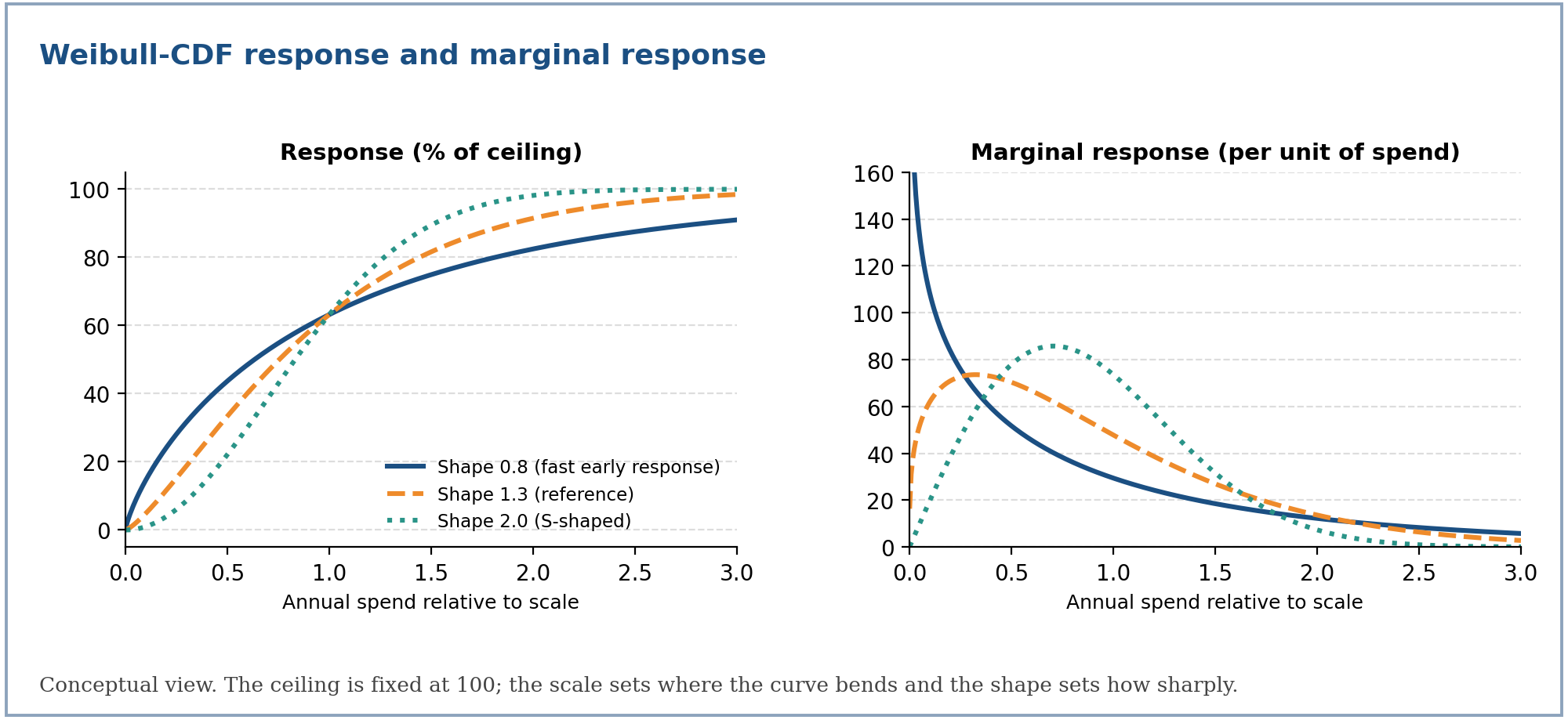
Weibull-CDF curve (Naukr AI default)
Response rises from zero toward a ceiling; the scale sets where the curve bends and the shape sets how sharply.
Terms: is annual incremental response at spend ; is the response ceiling; is the scale in spend units (response reaches about 63% of the ceiling at ); is the shape.
The spend at which the curve reaches half of its ceiling is
Half-saturation spend follows from the scale and shape.
Terms: is the spend giving 50% of the ceiling; and are the scale and shape; is the natural logarithm of 2.
This is the same curve family as the model's own saturation. With and as in the MMM Models tab, equals the form above with and . The model fits it on normalized exposure; the optimizer needs it on annual spend, which is what the next section builds.
Hill curve (compatible engines)
Curves fitted by other supported engines use the Hill family, and the optimizer accepts both:
Hill saturation on spend.
Terms: is the ceiling; is the half-saturation spend, ; is the shape. A shape above 1 gives an S-curve; a shape of 1 or below is concave from the origin.
Marginal response: the optimization signal
The optimizer climbs the marginal response, the exact analytic derivative of the curve. There is no finite differencing and no sampling.
Marginal response of the next unit of spend, for each family.
Terms: is the change in annual response per extra unit of spend; the other symbols are the curve parameters above. A tiny spend floor keeps the derivative finite at zero spend for shapes below 1.
Average ROI is reported to humans but is never the objective:
Derived business metrics for a vehicle at spend .
Terms: is average return per dollar; is the return of the next dollar; is profit per unit of response; is the saturation ratio, the share of the ceiling already reached.
From the Bayesian model to optimizer curves
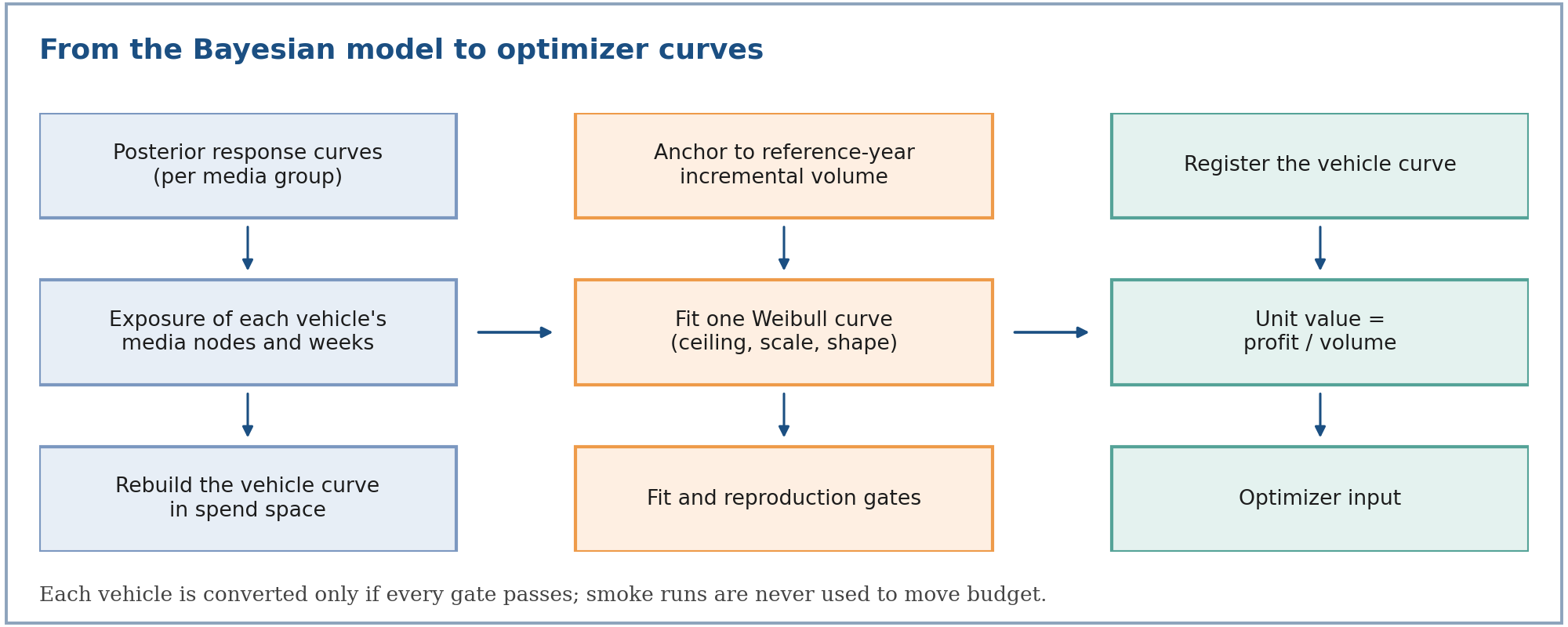
The MMM fits response on normalized exposure (a multiple of each media node's typical execution level). The optimizer needs annual spend per vehicle. A bridge rebuilds each vehicle's spend-space curve from the approved model and registers it as a Weibull-CDF curve.
1. Group curves. For each pooling group , take the published posterior-median half-response point and shape , and the group's response share
The model's own response share at normalized exposure .
Terms: is the response share between zero and one; is exposure as a multiple of the node's typical level; is the 50% response point; is the shape.
The published parameters are used directly when they reproduce the published mean curve to within 2% of the ceiling; otherwise they are refitted from the published curve points.
2. Vehicle curve. A vehicle is a set of media nodes and weeks. Scaling the vehicle's spend by a multiplier scales every node's exposure by , so
Vehicle response at spend multiplier , anchored to the reference-year incremental volume.
Terms: is the vehicle's annual response when spend is times the reference level; is its reported incremental volume in the reference year; is the set of node-week cells with positive exposure in that year; is the pooling group of cell ; is the cell's exposure relative to its node's typical level (the median positive exposure over the history).
The curve is evaluated on a grid of 61 multipliers from 0 to 3, at spend where is the vehicle's reference-year spend.
3. Single Weibull in spend space. One Weibull-CDF is fitted to those points, with the ceiling at least the largest response on the grid, the scale between 2% and 50 times the reference spend, and the shape between 0.5 and 6.
4. Unit value. The profit basis comes from the same reference year:
Profit per unit of response.
Terms: is the unit value used by the profit objective; and are the vehicle's incremental profit and incremental volume in the reference year.
Reference year. The latest complete year: the latest year whose total spend is at least 80% of the median year's total spend.
Quality gates. A vehicle is registered only if all of these hold:
| Gate | Threshold |
|---|---|
| Each group's published curve follows the model's own form | Maximum gap at most 2% of the ceiling |
| The vehicle curve is well described by one Weibull | Maximum gap at most 3% of the vehicle's yearly response |
| The registered curve reproduces the reported outcome at current spend | Difference at most 3% |
| Shape stays in a stable range | Between 0.5 and 6 |
| The vehicle had positive incremental volume and profit and execution in the reference year | Required |
A run is optimizable only when every vehicle that spent in the reference year converts cleanly, and only when it is a production run. A smoke (non-production) run publishes curves for display but is never used to move budget.
Assumptions recorded with every conversion: spend and exposure move together; saturation is evaluated on the period's exposure, with carryover not re-simulated; a node's typical level is the median of its positive exposure over the whole history.
Objective functions
The objective is a sum over every vehicle of every brand in the solve.
Per-vehicle contribution for each objective.
Terms: is revenue per unit of response (it defaults to when no price is set); is profit per unit of response; is the vehicle's spend.
The gradient of each contribution is the marginal response scaled the same way (, , or ), so the objective and its gradient always share one basis.
Because the budget constraint fixes , the profit objective equals . For a given budget, the profit and margin-weighted revenue objectives therefore choose the same allocation; the profit objective value is simply reported net of spend.
What an optimum looks like
Attach a multiplier to the budget constraint. At an optimum, the first-order conditions say that every vehicle that is free to move earns the same marginal value, and every vehicle held at a bound is on the correct side of it.
First-order (equal-marginal-return) conditions at the optimum, for the profit objective.
Terms: is the optimal spend; is the common marginal return implied by the budget; and are the bounds. With a binding group-share constraint, the vehicles in that group share a value shifted by that constraint's multiplier. This is a standard consequence of the Lagrangian, not an extra rule in the solver.
This is why the result is explainable: a vehicle sitting at its upper bound with a marginal ROI above the shared value is being held back by a guardrail, and loosening that guardrail would raise the objective.
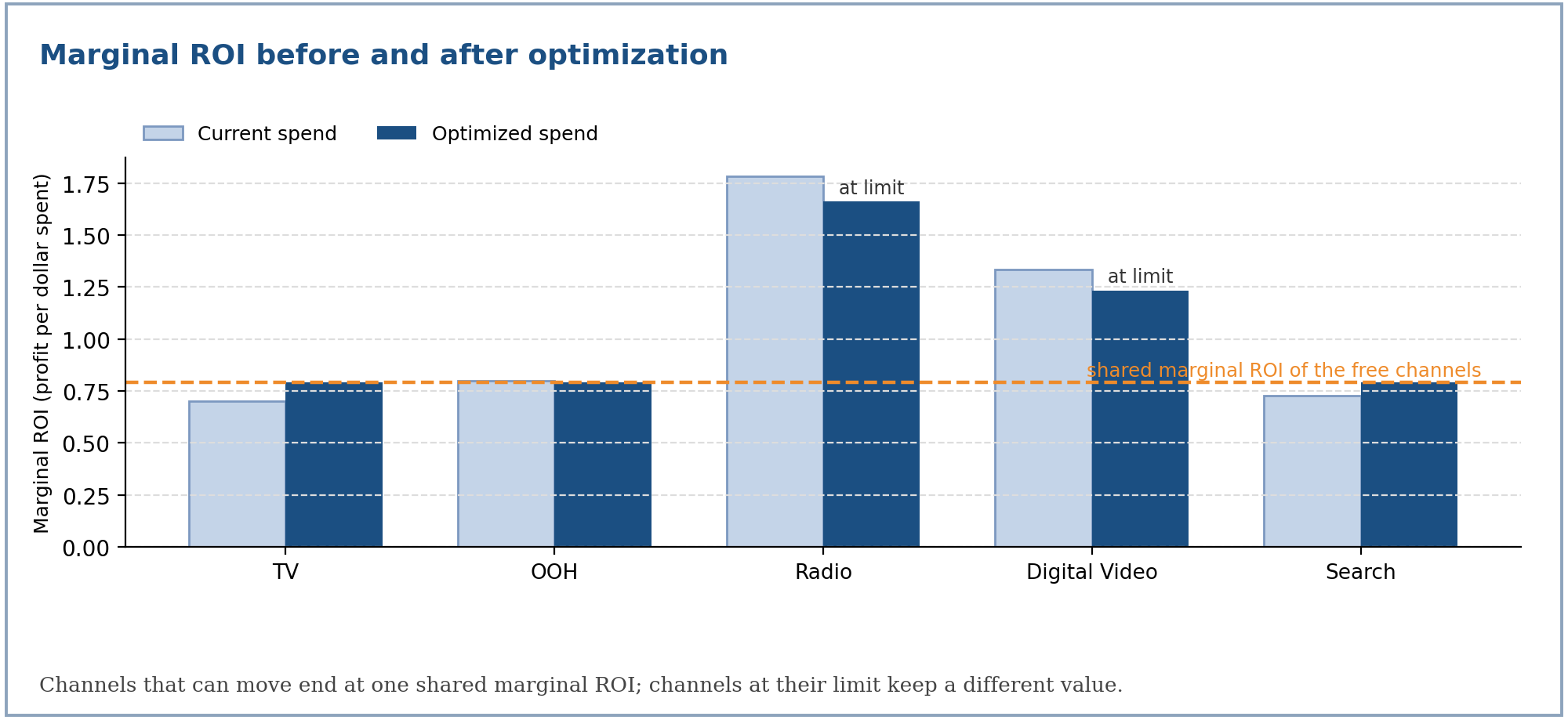
For S-shaped curves () the problem is not concave, so these conditions identify a local optimum. The solver safeguards below, and the validation gates, exist to catch the failure modes this creates.
Constraints and bounds
Vehicle bounds
For each vehicle, in this order of precedence:
- Locked vehicles are pinned at current spend: .
- Otherwise start from the hard guardrails (default 0) and (default unbounded).
- Narrow by the scenario's change limits.
- If the result is inverted, collapse to the upper bound.
Effective bounds for an unlocked vehicle.
Terms: is current spend; and are the allowed decrease and increase as fractions of current spend; and are hard dollar limits.
Budget and feasibility
The budget is an equality constraint, . Before solving, the optimizer checks that the problem is feasible:
Pre-solve feasibility check.
Terms: is the smallest total the bounds allow; is the largest. If the budget falls outside, the run stops with a plain-language error that says to reduce a pinned vehicle's change, unlock a vehicle, or change the budget.
Group shares
A group (Traditional, Digital, or a brand) is constrained as a share of the budget: . Both limits are enforced natively by the solver.
From a business request to constraints
The same mapping is used for every surface (see the Single Brand and Cross Brand tabs for the group and brand layers).
Total budget
The requested change applies to the movable slice of the budget; locked spend is added back unchanged.
Target total budget for a requested change .
Terms: is the current spend of locked vehicles; is the current spend of unlocked (reallocatable) vehicles; is the requested change as a fraction (positive for an increase, negative for a decrease, zero for no change).
Applying to the full current total instead would demand that the movable slice absorb a disproportionately large change whenever much of the budget is locked.
Default vehicle guardrail
Vehicles without an explicit limit get a hard default of with . The guardrail widens only if the budget itself moves further than , otherwise the target would be unreachable.
Default guardrail, widened only when the budget moves more than the default.
Terms: is the ratio of the target movable budget to the current movable budget; is the default guardrail (15%); and are the effective increase and decrease limits.
Explicit vehicle limits
| Request | Meaning |
|---|---|
| Increase 0, decrease 0 | No explicit limit; the default guardrail applies |
| Only an increase or only a decrease | A directional target: the vehicle is pinned to exactly |
| Both an increase and a decrease | A range: |
The solver
The problem is solved with sequential least squares programming (SLSQP) using the exact analytic gradient.
Normalization. Raw spend is around ten million, which flattens the objective in the saturated regime and makes SLSQP stall. The solve runs in budget-normalized space with , so variables are of order 0.1 and the budget equality is of order 1. The objective, gradient and constraints are converted in kind (the chain-rule factor cancels exactly in the gradient).
Feasible start. The starting point clamps current spend into the bounds, then redistributes the remaining budget into vehicles with headroom (or out of vehicles with room), for up to 64 passes.
Settings. At most 300 iterations, with a function tolerance of .
Stall recovery. SLSQP can report success after a single iteration while having moved essentially nowhere. A stall is detected when the solve took at most one iteration, moved less than from its start, and some vehicle actually had freedom to move. The solver then retries from the start nudged along its own gradient:
Restart point after a detected stall.
Terms: is the original feasible start; is the number of vehicles; is the ascent direction scaled to unit maximum. The retry is adopted only if it moved, converged, met the budget equality, and reached an objective at least as good as the stalled solution, so recovery can never make a result worse.
Each iteration's objective and spend are recorded, so a run shows the objective climbing toward the optimum.
Diagnostics and validation
Saturation zones
Each vehicle is labelled by how much of its ceiling it has reached. The band edges are an internal rule, not universal constants.
| Saturation ratio | Zone |
|---|---|
| Below 0.10 | Threshold |
| Below 0.45 | Growth |
| Below 0.70 | Optimal |
| Below 0.90 | Diminishing |
| 0.90 and above | Saturation |
Per-vehicle rows
For every vehicle the output reports current and optimized spend, the change in dollars and percent, current and optimized response, average and marginal ROI, the saturation ratio, the zone, and whether the optimum sits on its lower or upper bound.
Validation gates
Five checks run on every solution and are published in the summary:
| Gate | Passes when |
|---|---|
| Budget equality | Total optimized spend equals the budget within a relative tolerance of |
| Bounds respected | Every vehicle lies inside its own bounds |
| Locked unchanged | Every locked vehicle still equals its current spend |
| Marginal declines | Marginal response does not rise as spend grows, checked only past 50% saturation (below that, an S-curve legitimately rises) |
| Solver success | The solver reported convergence |
Weekly flighting
The solver produces one annual number per vehicle. The flighting engine phases it into 52 weeks.
Historical-share phasing
Each vehicle's annual optimum is phased by its own historical weekly share.
Terms: is the planned spend for vehicle in week ; is that vehicle's historical spend in week ; is its optimized annual spend. A vehicle with no history is phased flat at . Without a historical file, every vehicle is phased flat.
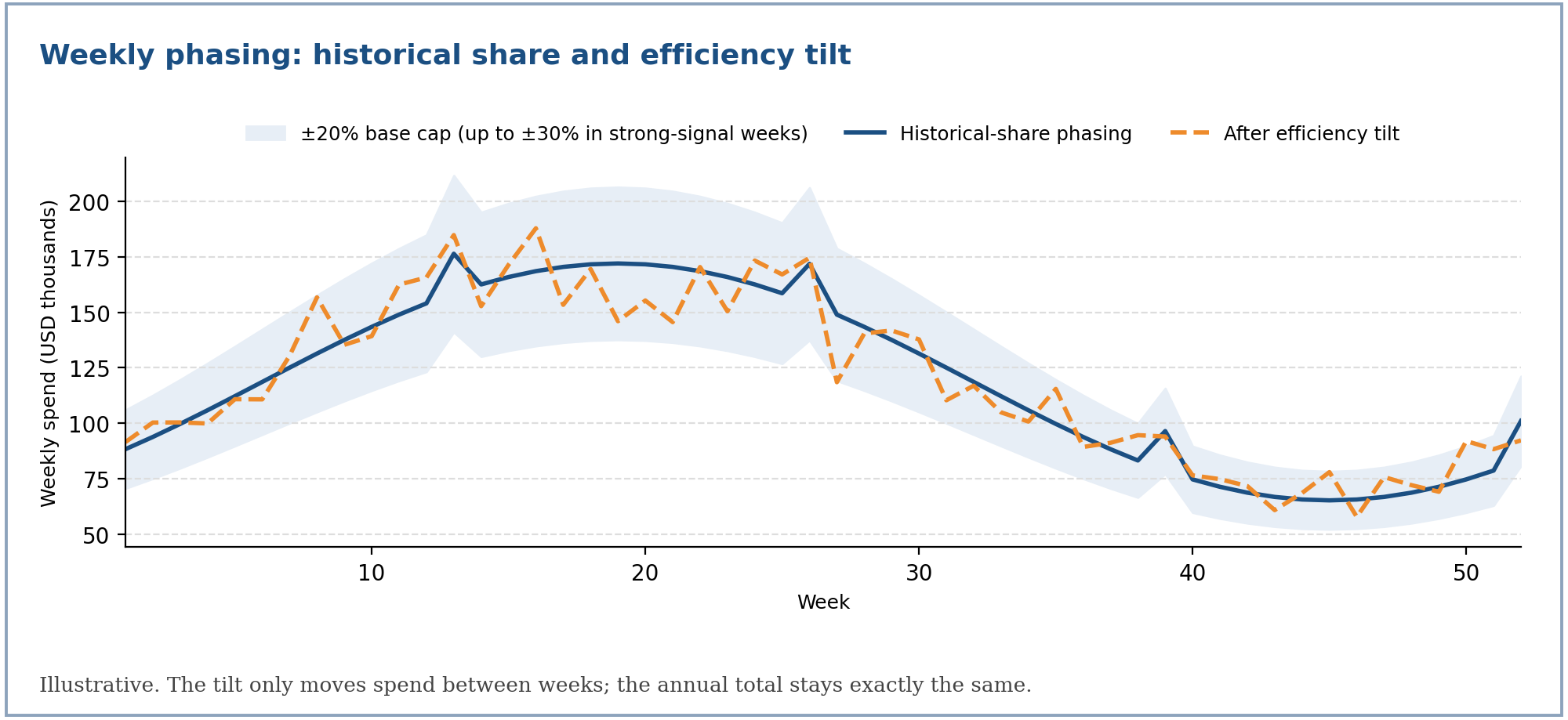
Efficiency tilt
When the model provides per-week attribution, spend is tilted toward weeks that were historically more efficient, then rescaled so the annual total is unchanged.
Weekly efficiency, tilt, and per-week cap.
Terms: is the model's own attributed contribution in week ; is the vehicle's average efficiency (ratio of sums); is the week's efficiency relative to average; the exponent 0.3 keeps the tilt gentle (a ratio of 2 scales a week by about 1.23); widens a week's cap from 1 to at most 1.5 times the base cap when its signal is strong; is the final weekly spend.
A vehicle needs at least 8 weeks with positive attribution and spend before it is tilted at all; otherwise it keeps its historical-share phasing unchanged.
Aggregate weekly cap
A second, cross-vehicle cap bounds each week's combined spend against that week's historical combined spend:
Aggregate weekly band.
Terms: is the historical combined spend in week ; is each vehicle's planned spend. Violating weeks are scaled to the nearest edge, and each vehicle's other weeks are rescaled to restore its annual total, for up to 5 rounds.
A feasibility guard runs first. If the optimized annual total already falls outside the sum of every week's band (for example a large annual increase phased into 52 weeks each capped at 15%), no weekly plan can satisfy both, so the cap is skipped rather than silently dropping budget. The annual decision made by the solver always wins.
Reporting metrics
The detailed media analysis is built from the optimized spend and the curves.
Reported metrics for a vehicle or any aggregate.
Terms: is price (revenue per unit); is margin (profit per unit); is response volume at the shown spend. ROI here is profit over spend, not revenue over spend.
Macro assumptions. Media-cost inflation (CPM) and price inflation apply to the optimized, forward-looking side only; the current column is always the untouched historical reference:
Macro adjustment of the optimized side.
Terms: is the net media-cost inflation (increase minus decrease): more cost means fewer response units per dollar; is the net price inflation, which raises value per unit.
Assumptions and limits
| Assumption | Consequence |
|---|---|
| Carryover is embedded in each curve | The optimizer does not re-simulate adstock; weekly plans phase by history, not by model |
| Annual spend maps to annual response | Curves are fitted and compared on an annual basis |
| One fitted mean curve per vehicle | Credible bands are published for display; they do not enter the solve |
| S-shaped curves are not concave | The result is a local optimum; the gates report convergence and validity |
| Guardrails are business inputs | A vehicle at a bound is a decision to review, not a modeling result |
MMM Optimizer: Single Brand
When to use it
Use single-brand optimization when one approved model covers one brand and you want to decide how that brand's annual budget should be split across its own vehicles.
Typical questions:
- "Keep the budget flat. Where should we shift spend?"
- "We can add 10%. Which vehicles should get it?"
- "The budget is being cut by 10%. What should go first?"
- "TV must come down by exactly 10%. What is the best split of the rest?"
What you provide and what the system supplies
| You provide | The system supplies |
|---|---|
| Objective: volume, revenue or profit | One approved response curve per vehicle |
| Budget change: none, increase, or decrease by a percentage | Current annual spend per vehicle (from the model baseline or your merged file) |
| Optional per-vehicle limits (directional or range) | Unit value (profit per unit) and price (revenue per unit) per vehicle |
| Optional Traditional / Digital group limits | Historical weekly spend, for the weekly plan |
| Optional macro assumptions (media-cost and price inflation) | Per-week attribution, when available, for the efficiency tilt |
| Target year for the plan | Locks for non-paid media and vehicles that failed fit-quality checks |
If no approved model exists, the run stops with a clear message. The optimizer never fabricates curves from raw data.
How a request becomes an optimization problem
Total budget
The requested change applies to the movable (unlocked) spend; locked spend is added back unchanged:
Target total budget for a requested change .
Terms: is the current spend of locked vehicles; is the current spend of unlocked vehicles; is the requested change as a fraction.
Vehicle limits
- No explicit limit (increase 0, decrease 0): the vehicle gets the default guardrail of ±15%, widened only if the budget itself moves further.
- One-sided limit: a directional target, pinned to exactly .
- Two-sided limit: a range, .
Campaign-level names (such as a TV campaign) roll up to their parent vehicle. If two campaign keys roll up to the same vehicle with different limits, the request is rejected as conflicting rather than silently merged. A directional limit that cannot be matched to any vehicle is rejected, and the message lists the available vehicles.
Traditional and Digital groups
Every vehicle belongs to Traditional or Digital. Each group's total is held in a band, whether or not you asked for a group limit. The movement cap is 10% by default and widens only if the budget moves further:
Group share band, with no explicit group request.
Terms: is the group's share of the budget; is the group's current spend; and are the smallest and largest totals its member vehicles can reach under their own bounds; is the ratio of target to current movable budget.
If you request a group move, it is treated like a vehicle limit (one-sided means a target, two-sided means a range), clamped first into what the vehicles can deliver and then into the movement cap. If the request had to change, the output says so, for example:
digital: channel-level moves are capped at 10% up, so the request was applied as +10.0%.
If the group bands could not jointly sum to the budget, they are widened only as much as needed, starting with groups you did not ask about, and the change is reported.
Locked vehicles
Vehicles that must not move are pinned at current spend and still count toward the total:
- non-paid media such as trade marketing and sponsorship,
- vehicles that failed fit-quality checks at model time,
- vehicles with no current spend (there is nothing to reallocate from).
Locked non-paid media is excluded from the paid-media rollups in the reports.
Run steps
- Resolve the approved model for the brand (stops with a clear message if none exists).
- Load vehicles and current spend.
- Build the scenario: total budget, vehicle bounds, group bands, locks.
- Solve and validate: the SLSQP solve, then the five validation gates.
- Build deliverables: the three-level table, the weekly plan, the summary, and the report.
Worked example
This is an illustrative example on synthetic numbers, computed with the production solver. It is not client data.
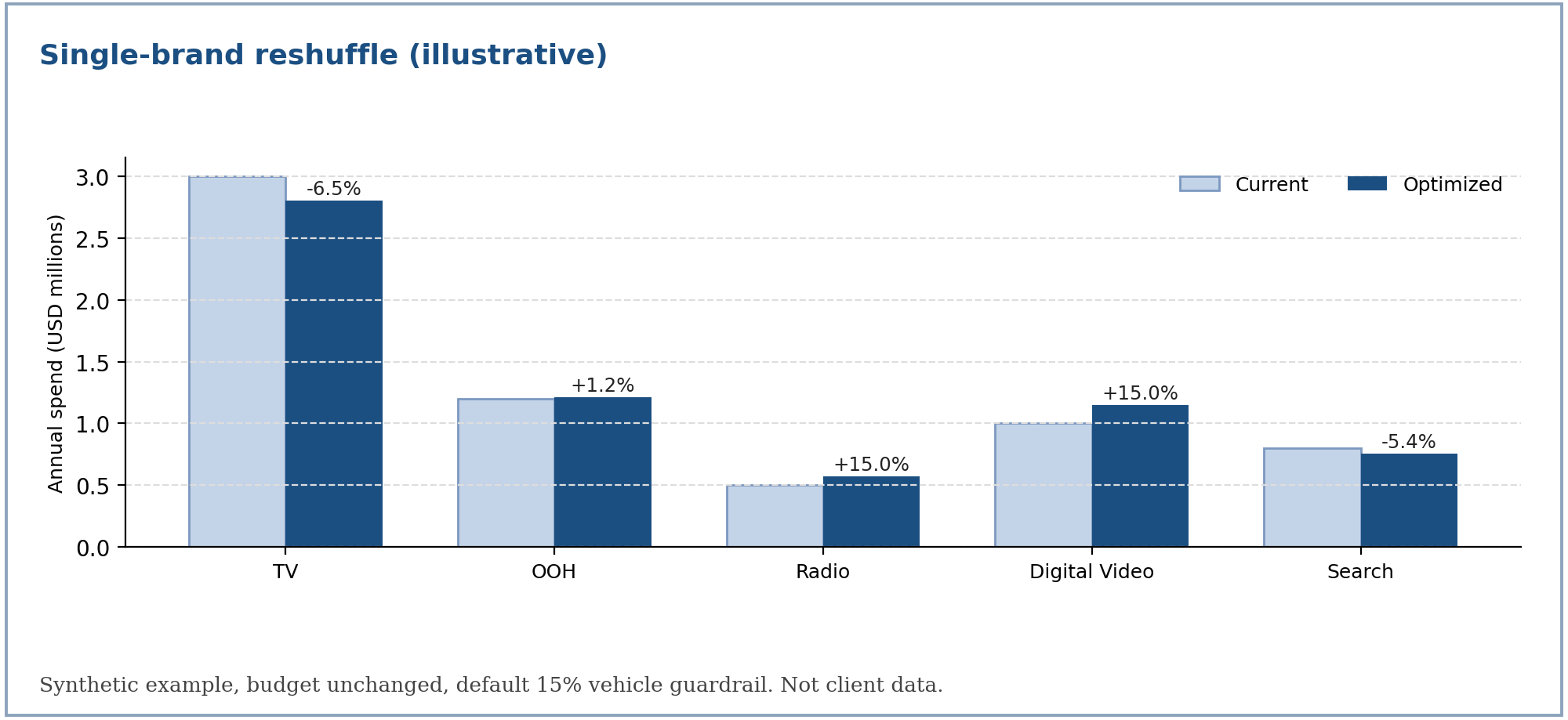
Setup. Five vehicles with Weibull-CDF curves, a profit value of 4.0 per unit of response for every vehicle, and a combined budget of 6.5 million.
| Vehicle | Group | Ceiling | Scale | Shape | Current spend |
|---|---|---|---|---|---|
| TV | Traditional | 1,300,000 | 2,000,000 | 1.3 | 3,000,000 |
| OOH | Traditional | 600,000 | 1,800,000 | 1.2 | 1,200,000 |
| Radio | Traditional | 450,000 | 700,000 | 1.5 | 500,000 |
| Digital Video | Digital | 950,000 | 1,700,000 | 1.1 | 1,000,000 |
| Search | Digital | 450,000 | 500,000 | 1.0 | 800,000 |
Scenario A: reshuffle (budget unchanged)
| Vehicle | Current | Optimized | Change | Marginal ROI | Saturation | Zone | At bound |
|---|---|---|---|---|---|---|---|
| TV | 3,000,000 | 2,803,978 | −6.5% | 0.793 | 0.79 | Diminishing | No |
| OOH | 1,200,000 | 1,214,400 | +1.2% | 0.793 | 0.46 | Optimal | No |
| Radio | 500,000 | 575,000 | +15.0% | 1.660 | 0.53 | Optimal | Upper |
| Digital Video | 1,000,000 | 1,150,000 | +15.0% | 1.234 | 0.48 | Optimal | Upper |
| Search | 800,000 | 756,622 | −5.4% | 0.793 | 0.78 | Diminishing | No |
The three vehicles free to move share one marginal ROI (0.793). Radio and Digital Video earn more at the margin but are held by the 15% guardrail, which is exactly the signal that a looser guardrail there would help. Total response rises by 38,514 units (+1.67%), worth about 154 thousand in profit at 4.0 per unit, with no extra spend. All five validation gates pass.
Scenarios B and C
| Vehicle | Current | B: budget +10% | Change | C: TV −10% and Digital +12% | Change |
|---|---|---|---|---|---|
| TV | 3,000,000 | 3,215,000 | +7.2% | 2,700,000 | −10.0% |
| OOH | 1,200,000 | 1,380,000 | +15.0% | 1,245,000 | +3.8% |
| Radio | 500,000 | 575,000 | +15.0% | 575,000 | +15.0% |
| Digital Video | 1,000,000 | 1,150,000 | +15.0% | 1,150,000 | +15.0% |
| Search | 800,000 | 830,000 | +3.7% | 830,000 | +3.8% |
| Total | 6,500,000 | 7,150,000 | 6,500,000 | ||
| Response lift | +155,430 (+6.74%) | +36,790 (+1.60%) |
- B: a 10% budget increase is spread toward the vehicles with the highest marginal return, with three vehicles reaching their upper limit.
- C: TV is pinned to exactly −10%. The request for Digital +12% exceeds the 10% group cap, so it is applied as +10% and the output reports the adjustment. The cost of the pin is visible: lift is 36,790 against 38,514 for the free reshuffle.
Reading the result
| Item | How to read it |
|---|---|
| Zone | Where the optimized spend sits on the curve: Threshold, Growth, Optimal, Diminishing or Saturation |
| At bound | The vehicle is held by a limit; compare its marginal ROI with the shared value to see what the limit costs |
| Adjustments | Any request that had to be clamped, with the requested and applied values and the reason |
| Validation gates | All five should pass; a failure is shown in the summary |
What can go wrong
| Situation | What happens |
|---|---|
| The budget falls outside what the bounds allow | The run stops with the totals and what to change: reduce a pinned vehicle's change, unlock a vehicle, or change the budget |
| Heavy locking and a large budget cut | The cut applies only to the movable slice, so the target stays reachable |
| A group request exceeds the movement cap | It is clamped and reported in the adjustments |
| A directional vehicle key matches nothing | The run is rejected and lists the available vehicles |
| Two campaign keys with different limits roll up to one vehicle | The run is rejected as conflicting |
| The PDF report cannot be rendered | The CSV and summary are still delivered |
For the formulas behind each step, see mmm-optimizer-methodology.
MMM Optimizer: Cross Brand
When to use it
Use cross-brand optimization when several brands are fitted as separate models but share one combined media budget, and you want to know whether budget should move between brands as well as between vehicles.
Typical questions:
- "Should some of Brand B's budget move to Brand A?"
- "Keep the combined budget flat. What is the best split across both brands?"
- "Brand A must grow by 5%. What is the best way to fund it?"
A single-brand run can only move money between a brand's own vehicles. A cross-brand run moves it across brand boundaries.
How it works
Each brand is fitted independently, so each brand's model stays exactly as fitted. For the optimization, the brands' vehicles are merged into one flat list and solved in one joint solve.
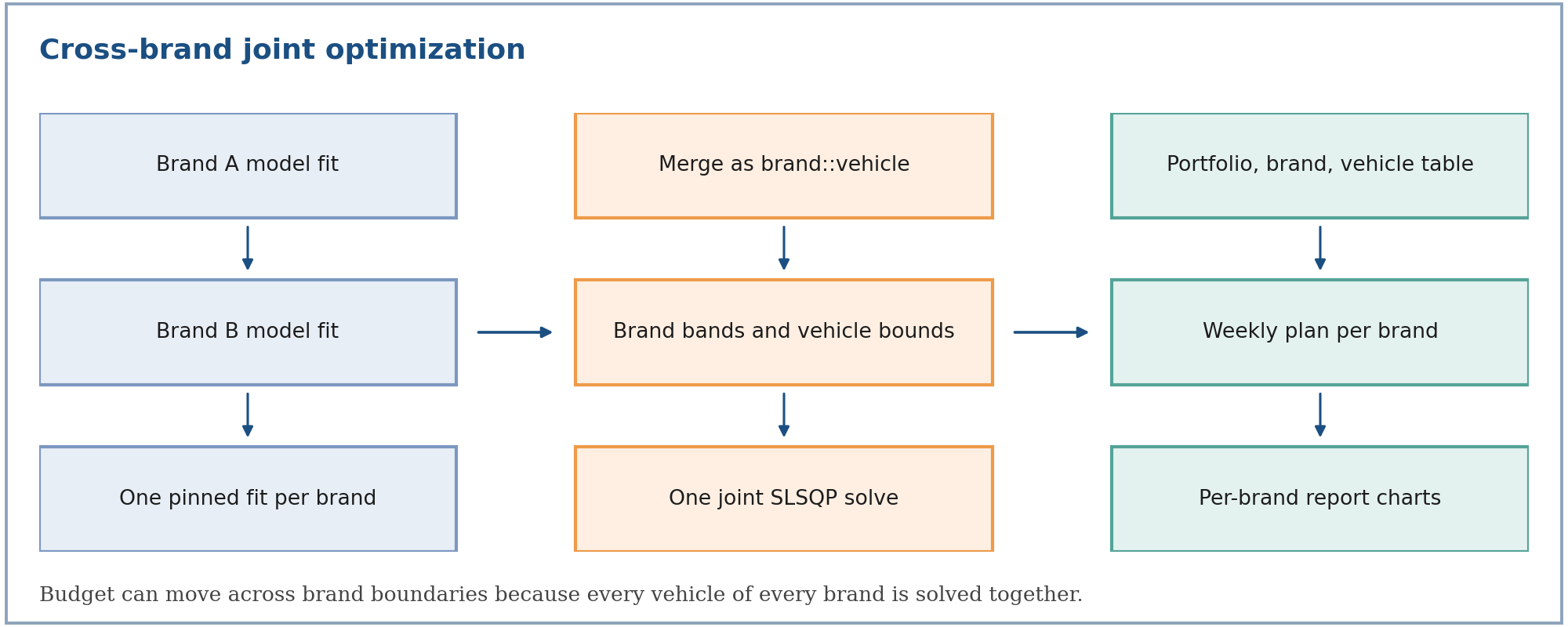
- One pinned fit per brand. The request names an exact approved fit for each brand. It is never resolved by brand label, which prevents a run silently picking up a different fit.
- Brand-qualified vehicles. Each vehicle is identified as brand and vehicle, so two brands can both have a TV vehicle without colliding.
- Brands may differ. Brands can have different vehicle sets and very different scales.
- No hierarchy in the solve. The solver sees a flat list of vehicles. Brands exist as groups for share constraints and as labels in the reports.
The cross-brand problem is the single-brand problem over the union of every brand's vehicles.
Terms: indexes a brand and a vehicle within it; is the vehicle's contribution to the objective (see Methodology); is the combined budget; and are the brand's minimum and maximum share of the combined budget.
At the optimum, every vehicle free to move earns the same marginal return across brands, not just within a brand. That is what makes a cross-brand reallocation meaningful.
Controls
| Control | Meaning |
|---|---|
| Combined budget change | Flat, increase or decrease by a percentage, applied to the movable spend of the whole portfolio |
| Brand limit | An increase or decrease for a brand's total (one-sided is a target, two-sided is a range), applied to that brand's movable spend |
| Vehicle limit within a brand | A limit on one brand's vehicle, resolved by brand and vehicle name |
| Default vehicle guardrail | ±15% for every vehicle without an explicit limit, widened only if the combined budget moves further |
| Brand movement cap | Every brand's total is held within ±10% of its movable spend by default |
| Locks | Non-paid media and vehicles that failed fit-quality checks stay at current spend |
| Macro assumptions | Media-cost and price inflation, applied to the optimized side of the reporting |
The brand band
Every brand always gets a band, whether or not you asked for a brand limit. The band is the intersection of the brand cap and what is actually reachable.
Reachable range for brand , given the other brands' own bounds.
Terms: and are the smallest and largest totals brand 's vehicles can reach under their own bounds; and are the same sums over all other brands. Because the combined budget is fixed, a brand's increase must be funded by other brands' decreases, so its total can only lie in this range.
Brand band with no explicit request: the brand cap, intersected with the reachable range.
Terms: is the brand's current spend; is its movable (unlocked) spend; and are the brand movement cap (10%, widened only when the combined budget moves further); is the ratio of target to current movable budget across the portfolio.
The brand cap is a hard ceiling. Unlike the vehicle guardrail, which fills in only when you gave no limit, an explicit brand request for more than the cap is clamped down and reported.
Explicit brand requests
A percentage on a brand applies to that brand's movable spend, the same basis as the combined-budget change and as the reports (locked spend is excluded). A request of +5% on a brand with 6 million movable and 13 million locked means +0.3 million, not +1 million.
A one-sided request becomes a target:
Target for a directional brand request, then clamped in this order.
Terms: is the requested change as a fraction of movable spend; is the requested brand total. When a target sits exactly on a limit, a 0.1% band is kept around it so the solver retains a sliver of room. Interior targets stay exact.
Requests are processed from the smallest dollar change to the largest, and each clamped target becomes a fixed bound for the next, so the full set is jointly feasible, the smaller request is met exactly, and the larger one is adjusted. The order you submit them in does not matter.
What is reported when a request cannot be met
Nothing is silently dropped. Every adjustment is reported with the requested and applied values and a reason:
| Reason | Meaning |
|---|---|
| Brand cap exceeded | The request was larger than the brand movement cap and was clamped to it |
| Channel limits | The brand's own vehicle limits cannot deliver that change |
| Other brands' capacity | With the combined budget fixed, the other brands cannot give up or absorb that much |
| All locked / no spend | The brand has nothing movable, so its limit was ignored |
| Brand cap infeasible | The cap could not be met together with the other brands' limits, so the wider reachable range was used |
| Unknown brand | The brand is not in this run, so its limit was ignored |
If every brand asked for a fixed change but the combined budget cannot fund them all, the output also states the combined-budget change that would make the requests consistent.
Worked example
This is an illustrative example on synthetic numbers, computed with the production solver. It is not client data.
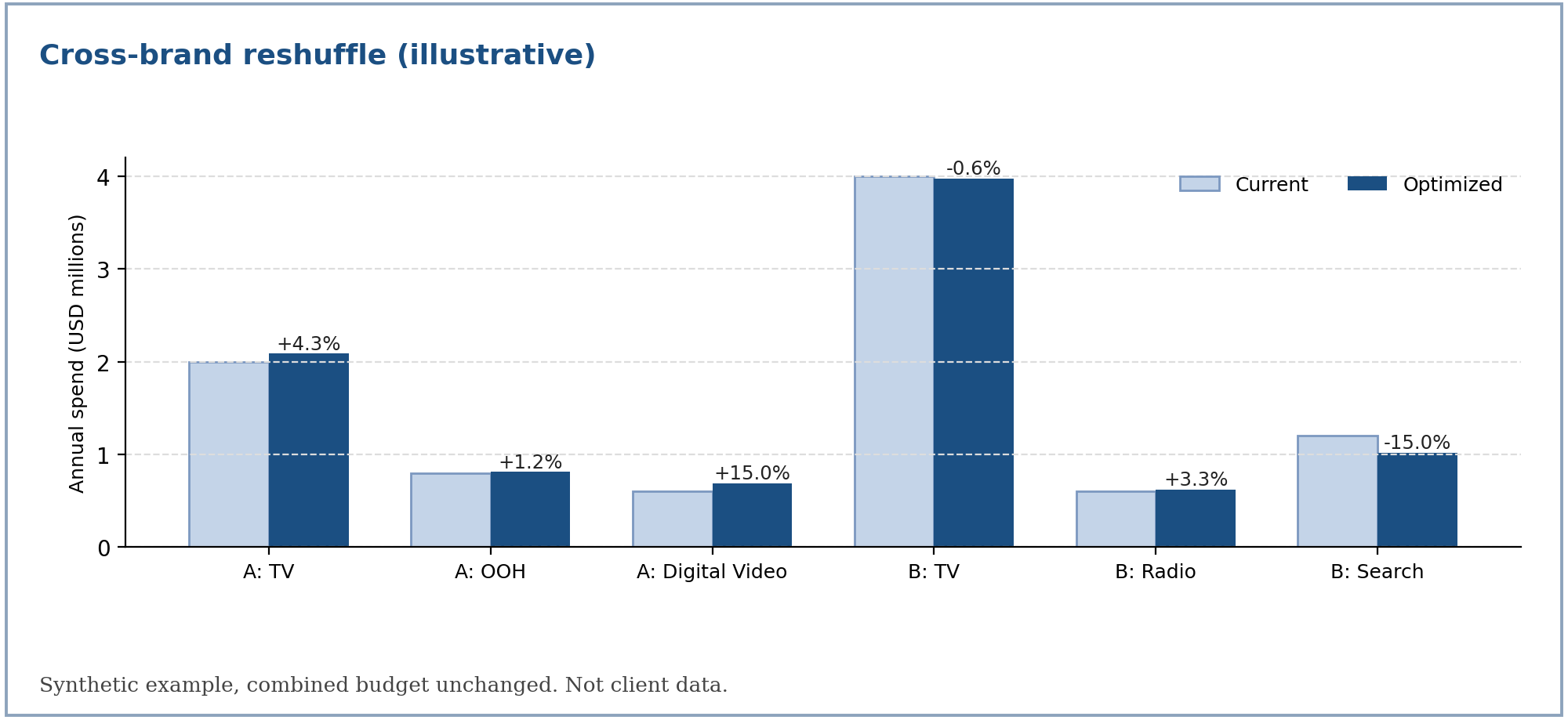
Setup. Two brands, Weibull-CDF curves, a combined budget of 9.2 million. Brand A has a profit value of 4.0 per unit and Brand B 3.4 per unit, on the same basis.
| Vehicle | Ceiling | Scale | Shape | Current spend |
|---|---|---|---|---|
| A: TV | 1,000,000 | 1,600,000 | 1.3 | 2,000,000 |
| A: OOH | 450,000 | 1,300,000 | 1.2 | 800,000 |
| A: Digital Video | 700,000 | 1,100,000 | 1.1 | 600,000 |
| B: TV | 2,100,000 | 3,800,000 | 1.3 | 4,000,000 |
| B: Radio | 300,000 | 500,000 | 1.5 | 600,000 |
| B: Search | 600,000 | 900,000 | 1.0 | 1,200,000 |
Reshuffle across both brands
| Vehicle | Current | Optimized | Change | Marginal ROI | At bound |
|---|---|---|---|---|---|
| A: TV | 2,000,000 | 2,086,126 | +4.3% | 0.858 | No |
| A: OOH | 800,000 | 809,776 | +1.2% | 0.858 | No |
| A: Digital Video | 600,000 | 690,000 | +15.0% | 1.469 | Upper |
| B: TV | 4,000,000 | 3,974,571 | −0.6% | 0.858 | No |
| B: Radio | 600,000 | 619,527 | +3.3% | 0.858 | No |
| B: Search | 1,200,000 | 1,020,000 | −15.0% | 0.730 | Lower |
Four vehicles across the two brands end at the same marginal ROI (0.858): that is the cross-brand equal-return condition. Brand A's total rises 5.5% and Brand B's falls 3.2%, with the combined budget unchanged. All validation gates pass.
Adding a brand-level request
| Request | Brand A total | Profit objective | Adjustments reported |
|---|---|---|---|
| None (reshuffle) | 3,585,902 (+5.5%) | 2,678,186 | None |
| Brand A +5% | 3,570,000 (+5.0%) | 2,678,124 | None; met exactly |
| Brand A +25% | 3,740,000 (+10.0%) | 2,672,342 | Clamped: first by the vehicle limits to +15%, then by the brand cap to +10% |
The +5% target is met exactly and costs almost nothing in profit. The +25% request is clamped to the 10% brand cap, and the output says so. The profit objective falls only slightly with each added constraint, which is how you read the price of a constraint. Lift in raw response units is not the right comparison here, because the two brands carry different unit values and the objective is profit.
Outputs
| Output | Content |
|---|---|
| Detailed media analysis | Level 1 is the whole portfolio, Level 2 one row per brand, Level 3 one row per vehicle labelled by brand and vehicle |
| Weekly flighting plan | Built once per brand from that brand's own history and attribution, then combined; the media type column carries the brand |
| Optimization summary | Solver status, validation gates, adjustments, assumptions, and any brand that was skipped |
| Report (PDF) | One weekly budget chart per brand, because a combined chart is misleading when brands differ greatly in scale |
If one brand's pinned fit is missing or no longer matches the request, that brand is skipped and reported, and the run continues with the rest. The run fails only if no brand can be resolved. The phasing baseline is the earliest of the brands' most recent complete years, so every brand is phased from a full year of history. A partly refreshed trailing year is never used as the baseline.
What you need to ensure
| Requirement | Why |
|---|---|
| Same response unit and value basis across brands | The solve equalizes marginal value across all vehicles, which is only meaningful if every brand's response and unit value are on one basis (for example incremental profit per unit). The optimizer does not check units or currency. |
| Annual spend in one currency and year basis | Curves are fitted on annual spend |
| One fit per brand | A brand appears once, with an exact approved fit |
| Independent source data | Two entries built from the same underlying data would count the same budget twice |
For the formulas behind each step, see mmm-optimizer-methodology.
MMM Optimizer: Headless
What is the headless optimizer?
The headless optimizer runs an optimization on a saved scenario against a pinned, approved model fit, with no interactive session. Nobody has to sit in the optimizer screen while it works:
- you start it from a saved scenario, an agent, or the API;
- it returns immediately with a run identifier;
- the solve runs as a background job;
- you collect the same outputs (tables, weekly plan, summary, report) when it completes.
It is the same solver and the same outputs as the interactive experience, so a headless result means exactly what an interactive one does. Headless is a way of running, not a different model.
It never refits the model. It reallocates budget from a fit that has already been approved, which is why it can run repeatedly and quickly.
How it is started
| Surface | How it starts a headless run |
|---|---|
| Media Workspace | Run the optimizer on a saved project scenario; it uses the project's primary model |
| Agent Builder | An optimization agent submits the request and collects the result |
| Chat assistant | The assistant runs the optimization as a long-running step and resumes with the result |
| API | A request with the datasource, objective and constraints |
Single-brand and cross-brand runs both work this way. Cross-brand runs carry one pinned fit per brand.
Lifecycle
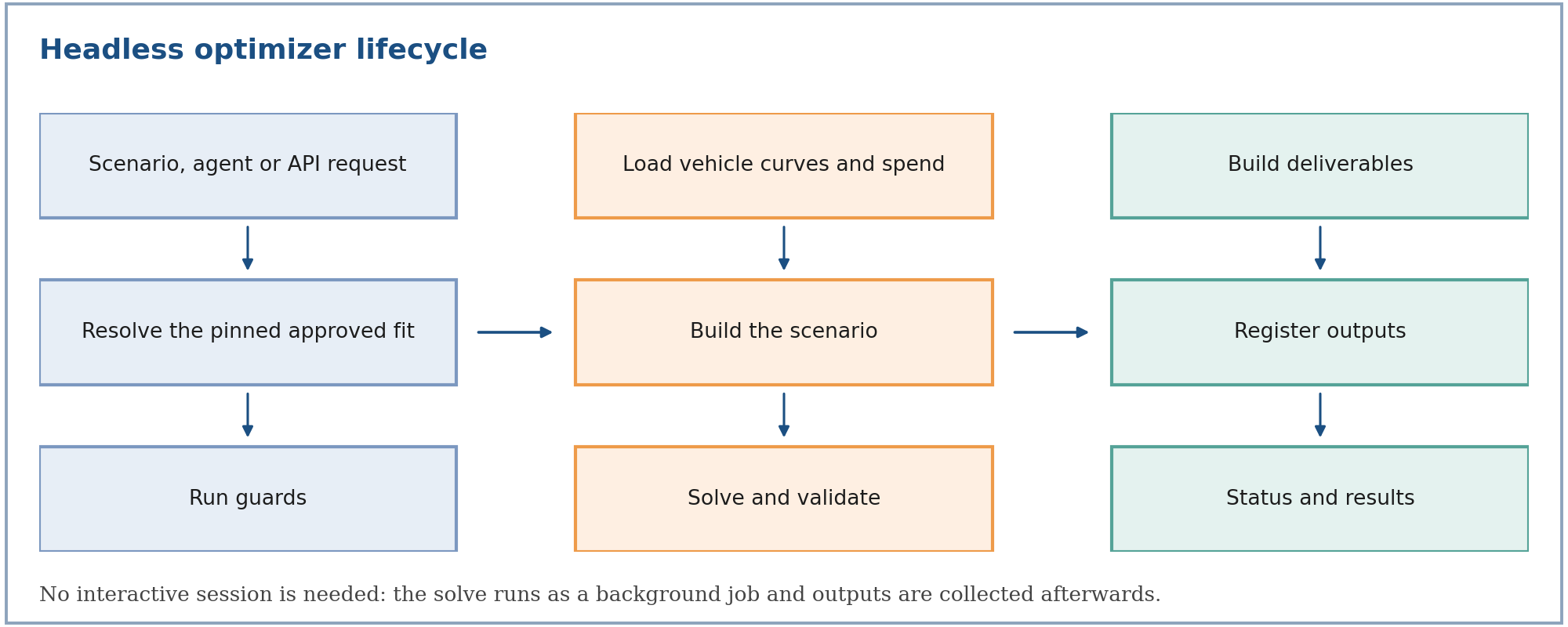
- Request. A scenario, agent or API call supplies the objective, budget change and constraints.
- Resolve the fit. The run targets one approved fit. In Media Workspace that is the project's primary fit, and in a cross-brand run it is the pinned fit for each brand, rather than simply the newest one.
- Run guards. The run is refused if a guard fails (see below).
- Load vehicle curves and spend. Current spend comes from the model baseline, or from the supplied merged file or override.
- Build the scenario. The same mapping as the interactive path: total budget, guardrails, group or brand bands, locks.
- Solve and validate. SLSQP, the stall safeguard, and the five validation gates. The convergence trace, the per-vehicle curve parameters, and the average ROI before and after are logged.
- Build deliverables. The detailed media analysis, the weekly plan, the summary and the report.
- Register outputs. The files are stored and linked to the run.
- Status and results. The run moves from pending to completed or failed, and the outputs can be read.
Guarantees
| Guarantee | What it means |
|---|---|
| Fails loudly | If no fitted model exists, or the model has no response curves, the run stops with a clear message. The optimizer never invents curves from raw data. |
| Pinned where a fit is chosen | A Media Workspace scenario runs against the project's primary fit, and a cross-brand run against each brand's pinned fit. A newer fit appearing later never silently replaces it. |
| Deterministic | There is no sampling. The same fit, request and data produce the same allocation. |
| Nothing silent | Requests that had to be clamped, locks that were applied, assumptions used, and solver status are all written to the summary. |
| Best-effort report | If the PDF cannot be rendered, the tables, the weekly plan and the summary are still delivered. |
Run guards
A headless run is refused, with a clear message, when:
| Guard | Why |
|---|---|
| No primary model is set for the project | There is no approved fit to optimize against |
| The primary model has no channel response data | The optimizer would otherwise fall back to a different model, so it refuses instead. A smoke run, or a model with a vehicle that failed the conversion gates, has no registered response curves, so it is refused here |
| The scenario does not belong to the project, or you cannot see it | Only the author, or a shared reader, may run a scenario |
| The scenario is already running | A second run would overwrite the first run's result |
Scenarios and staleness
A scenario stores the objective, budget change and constraints. In a project, it runs against the project's primary fit. If the primary model is later changed, a scenario whose last result came from a different fit is marked stale, so you can see that its numbers no longer reflect the current primary model, and re-run it deliberately.
Repeated runs of an unchanged scenario against an unchanged fit give identical numbers. A newer fit never replaces a pinned one automatically.
Outputs
The outputs are the same as the interactive path:
| Output | Content |
|---|---|
| Detailed media analysis | Portfolio, group or brand, and vehicle rows with current vs optimized spend, volume, revenue, profit, ROI and cost per unit |
| Weekly flighting plan | Each vehicle's annual optimum phased by its own history and attribution |
| Optimization summary | Solver status, validation gates, adjustments, macro assumptions used, model used, target year |
| Report (PDF) | Business-readable summary and weekly budget charts |
Scenario comparisons surface the ROI change of the All Media row, not the profit change: a spend-cutting scenario can show a profit drop while still improving ROI, so per-dollar efficiency is the fairer comparison.
Typical use cases
| Use case | How headless helps |
|---|---|
| Compare scenarios | Run several saved scenarios against the same primary fit and compare their ROI change |
| Repeatable planning cycles | Re-run a saved scenario after the fit is re-approved, and see that it is flagged stale until you do |
| Agent-driven planning | Let an agent run the optimization and write the result into a report |
| Portfolio planning | Run a cross-brand scenario with one pinned fit per brand |
When a run does not complete
| Symptom | Likely cause | What to do |
|---|---|---|
| Refused at start | A run guard failed | Read the message; it names the missing model, the permission, or the running scenario |
| Stops with an infeasible-budget error | Locks and limits leave no room for the budget | Reduce a pinned vehicle's change, unlock a vehicle, or change the budget |
| Completes but a validation gate fails | Solver or constraint issue in the solution | Read the summary; do not use the allocation until it passes |
| Completes with adjustments | Some requests were clamped | Read the adjustments for the requested and applied values |
| No PDF | The report render failed | Use the tables and summary; they are delivered regardless |
For the formulas behind the solve, see mmm-optimizer-methodology.